ReDel
ReDel is a toolkit for researchers and developers to build, iterate on, and analyze recursive multi-agent systems.
It consists of two main parts: a Python library for building, running, and logging systems, and a web visualizer to view system logs and interact with systems in a sandbox environment.
What is a recursive multi-agent system?
A multi-agent system is an application that uses multiple large language models (LLMs) working together to accomplish complex tasks or answer complex questions beyond the capabilities of a single LLM. In most cases, each LLM is provided with tools that it can use to give it additional capabilities, like searching the internet for real-time data.
Often, these systems are defined manually, with a human responsible for defining a rigid graph of agents and defining each agent’s role and responsibilities (usually through a prompt).
A recursive multi-agent system takes this one step further – rather than a human defining the layout of multiple agents, a recursive system gives a single root agent a tool to spawn additional agents. When faced with a complex task, the root agent decomposes the task into smaller subtasks, then delegates those tasks to sub-agents. Each sub-agent can then either complete the task if it is small enough, or recursively decompose and delegate the task further.
Note
This is where the toolkit’s name, ReDel, comes from: it’s short for Recursive Delegation.
In the rest of this documentation, you’ll learn how to use ReDel to define new tools, define delegation schemes, build recursive multi-agent systems, and interact with the systems you’ve built.
The ReDel Class
The ReDel class is the main class in the Python library, and the parameters you pass to it control what LLM(s) the system uses, what tools it has available, how it delegates tasks, and where it logs events.
It’s pretty formidable and we’ve copied the constructor’s docs here. Below, we’ll break it down and talk about each part.
- class redel.ReDel(
- *,
- root_engine: BaseEngine | None = None,
- delegate_engine: BaseEngine | None = None,
- root_system_prompt: str | None = DEFAULT_ROOT_PROMPT,
- root_kani_kwargs: dict | None = None,
- delegate_system_prompt: str | None = DEFAULT_DELEGATE_PROMPT,
- delegate_kani_kwargs: dict | None = None,
- delegation_scheme: type | None = DelegateWait,
- max_delegation_depth: int = 8,
- tool_configs: dict[type[_ToolBaseT], ToolConfig] | None = None,
- root_has_tools: bool = False,
- title: str | AutogenerateTitle | None = AUTOGENERATE_TITLE,
- log_dir: Path | None = None,
- clear_existing_log: bool = False,
- session_id: str | None = None,
This class represents a single session of a recursive multi-agent system.
It’s responsible for:
all delegation configuration options
all the spawned kani and their relations within the session
dispatching all events from the session
logging events
All arguments to the constructor are keyword arguments.
- Parameters:
root_engine – The engine to use for the root kani. Requires function calling. (default: gpt-4o) See Engines for a list of available engines and their capabilities.
delegate_engine – The engine to use for each delegate kani. Requires function calling. (default: gpt-4o) See Engines for a list of available engines and their capabilities.
root_system_prompt – The system prompt for the root kani. See
redel.kanisfor default.root_kani_kwargs – Additional keyword args to pass to
kani.Kani.delegate_system_prompt – The system prompt for the each delegate kani. See
redel.kanisfor default.delegate_kani_kwargs – Additional keyword args to pass to
kani.Kani.delegation_scheme – A class that each kani capable of delegation will use to provide the delegation tool. See
redel.delegationfor examples. Can beNoneto disable delegation.max_delegation_depth – The maximum delegation depth. Kanis created at this depth will not inherit from the
delegation_schemeclass.tool_configs – A mapping of tool mixin classes to their configurations (see
ToolConfig).root_has_tools – Whether the root kani should have access to the configured tools (default False).
title – The title of this session. Set to
redel.AUTOGENERATE_TITLEto automatically generate one (default), orNoneto disable title generation.log_dir – A path to a directory to save logs for this session. Defaults to
$REDEL_HOME/instances/{session_id}/(default~/.redel/instances/{session_id}).clear_existing_log – If the log directory has existing events, clear them before writing new events. Otherwise, append to existing events.
session_id – The ID of this session. Generally this should not be set manually; it is used for loading previous states.
So what do all of these parameters mean?
First, you should be familiar with the concept of root and delegate agents. Every ReDel system has exactly one root agents: it’s the only agents that exists at first, and the one a human user interacts with. Usually, it’s responsible for decomposing and delegating tasks to delegate agents (which are all other than the root). This creates a tree of agents, with tasks getting more and more granular as you go further down the tree.
With that in mind, we can break down the parameter list into groups.
Kani Arguments
Engines
The root_engine and delegate_engine are the LLMs that the root agent and delegate agents will use, respectively.
These take the form of Kani Engines, which means that they are interchangeable and use a consistent
interface regardless of the underlying LLM (see the Kani documentation for more details).
If not set, the default engine is gpt-4o with temperature=0.8, top_p=0.95:
from kani.engines.openai import OpenAIEngine
OpenAIEngine(model="gpt-4o", temperature=0.8, top_p=0.95)
Prompts
The root_system_prompt and delegate_system_prompt will be sent, as system messages, to every request to each
root and delegate agent, respectively. By default, these are:
root
# Goals
Your goal is to answer the user’s questions and help them out by performing actions. While you may be able to answer many questions from memory alone, the user’s queries will sometimes require you to take actions. You can use the provided function to ask your capable helpers, who can help you take actions. The current time is {time}.
delegate
You are {name}, a helpful assistant with the goal of answering the user’s questions as precisely as possible and helping them out by performing actions. You can use the provided functions to take actions yourself or break queries up into smaller pieces and ask your capable helpers, who can help you. If the user’s query involves multiple steps, you should break it up into smaller pieces and delegate those pieces - for example, if you need to look up multiple sites, delegate each search to a helper. Say your plan before you do. If those pieces can be resolved at the same time, delegate them all at once. You may do multiple rounds of delegating for additional steps that depend on earlier steps. The current time is {time}.
The strings {name} and {time} will be replaced with an agent’s name (see BaseKani) and the current
date and time respectively for each request to the LLM.
Additional Kani Arguments
To further control each agent, you can also pass root_kani_kwargs and delegate_kani_kwargs, which will be passed
to each root and delegate’s kani’s constructor. To see a list of valid arguments, see kani.Kani
(note that engine and system_prompt have their own dedicated arguments as part of ReDel).
Delegation Configuration
The delegation_scheme is a class that should provide a delegate() function. The class should inherit from
DelegationBase. For more information on the included delegation schemes and how to define your own delegation
schemes, see Delegation.
max_delegation_depth controls how many layers of delegation the system is allowed to do (i.e., the depth of the
agent tree). ReDel disables delegation by removing the delegate() function from an agent’s list of available tools
when this limit is reached.
Tool Configuration
tool_configs is a dictionary, where the keys are classes and the values are their configurations
(ToolConfig). Specifically, each key is a class that defines a tool: a group of functions that can be exposed
to an agent. This class should inherit from ToolBase. For more information about the included tools and how
to define your own tools, see Tools.
The tool configuration determines which agents have access to the tool and what arguments to call the tool constructor with. We recommend not giving the root agent access to any tools, as the root agent is prone to overcommitting instead of delegating when faced with a complex task.
An example of a tool configuration that gives all delegate agents access to the included web browsing tool is:
from redel.tools.browsing import Browsing

sys = ReDel(
    ...,
    tool_configs={
        Browsing: {
            "always_include": True,
            "kwargs": {"long_engine": long_engine},  # long_engine defined somewhere else
        },
    },
)
Note
In a future version, tools will be retrieved instead of always included or excluded, hence why they must be explicitly included in the current version to avoid breaking changes.
If root_has_tools is True, the root agent will have access to all of the same tools each delegate agent has
access to, in addition to any tools with always_include_root set to True.
Logging Configuration
ReDel automatically logs each run of a ReDel system, allowing researchers and developers to easily analyze system outputs and introspect internal behaviour. These arguments configure where these logs are saved and other logging behaviour. To learn more about the logging, see Events & Logging.
title is a human-readable title for the system’s run. This allows you to search previous sessions in the web
visualizer.
You can set this to the special value redel.AUTOGENERATE_TITLE in order to have an LLM generate the title after
a couple rounds of interaction, which is particularly useful for web-based interactive sessions.
log_dir is the directory where the session’s events should be saved. ReDel will create a new save the system’s event
logs and final state as events.jsonl and state.json in this directory.
If the log_dir already contains an existing save, clear_existing_log controls whether new events should be
appended to an existing events.jsonl file or if the file should be truncated before writing events. This should be
True if the session does not load the existing save (e.g. rerunning an experiment from scratch) and False if it
does (e.g. continuing an interactive session).
Interacting with a ReDel System
Now that we know how to configure a system, how do we actually use it?
There are two primary ways to interact with a system now that you’ve configured it: interactively, through the web interface, or programmatically. The former is particularly useful to debug your system’s behaviour, iterate on prompts, or otherwise provide an interactive experience. The latter is useful for running experiments and batch queries.
Serving for Web Interface
To serve a ReDel configuration using the included web interface, the library includes the VizServer class.
This class takes a ReDel instance and will make copies of it to serve interactive chats.
from kani.engines.openai import OpenAIEngine
from redel import Redel
from redel.server import VizServer
from redel.tools.browsing import Browsing

# configure your LLMs - see the Kani engine documentation for more info
root_engine = OpenAIEngine(model="gpt-4o", temperature=0.8, top_p=0.95)
delegate_engine = OpenAIEngine(model="gpt-3.5-turbo", temperature=0.8, top_p=0.95)

# a ReDel session configuration, acting as a prototype for interactive sessions
redel_proto = ReDel(
    root_engine=root_engine,
    delegate_engine=delegate_engine,
    tool_configs={
        Browsing: {
            "always_include": True,
            "kwargs": {"long_engine": long_engine},
        },
    },
)

# pass the prototype to VizServer
server = VizServer(redel_proto)

# VizServer.serve() makes the web interface available at 127.0.0.1:8000 by default
server.serve()
This will allow you to chat with the current configuration and visualize the computation tree:
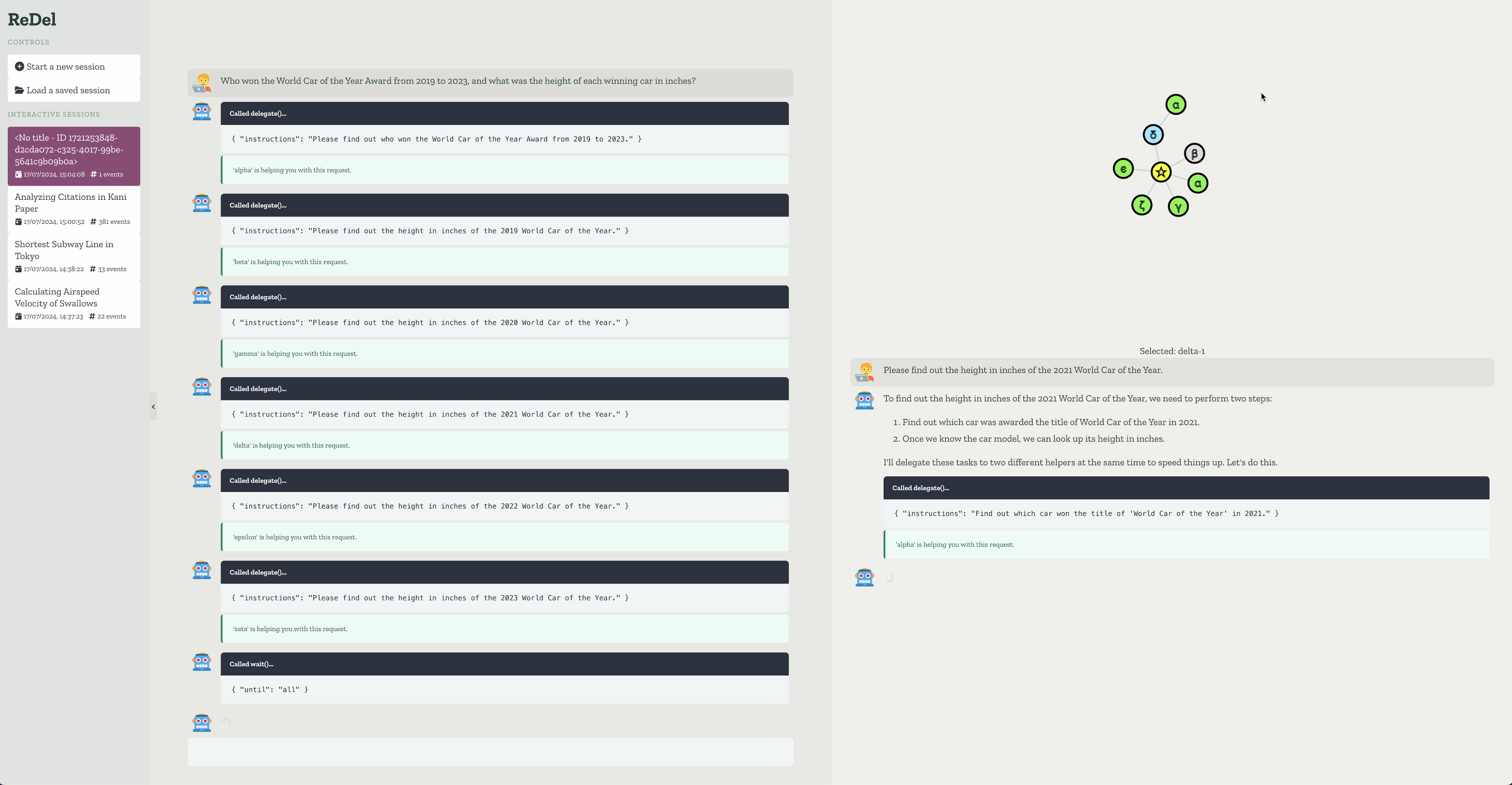
See Web Interface for more information about the web interface.
Programmatic
Otherwise, to use a ReDel configuration in a larger program, you should use ReDel.query() to send queries
to the root node. This method will return an iterator of events that the system emits – you can use this to listen
for specific events, or filter the stream for events.RootMessage to emulate a chat with a single agent.
The minimal script for programmatically querying a ReDel system looks like this:
import asyncio
from kani import ChatRole
from redel import ReDel, events

async def main():
    ai = ReDel()  # configure your system here, or leave blank for a default system

    async for event in ai.query("What is the airspeed velocity of an unladen swallow?"):
        # your event logic here - this example prints all the messages from the root
        if isinstance(event, events.RootMessage) and event.msg.role == ChatRole.ASSISTANT:
            if event.msg.text:
                print(event.msg.text)

asyncio.run(main())
In most cases, however, your programmatic entrypoint will be significantly longer, involving any data loading and pre-/post-processing steps you need for your own application.
For example, if you’re an academic wanting to run the ReDel system over each task in a dataset, you might have a script that looks like this:
import asyncio
from kani import ChatRole
from kani.engines.openai import OpenAIEngine
from redel import ReDel, events
from redel.delegation import DelegateOne
from redel.tools.browsing import Browsing

# configure your LLMs - see the Kani engine documentation for more info
root_engine = OpenAIEngine(model="gpt-4o", temperature=0.8, top_p=0.95)
delegate_engine = OpenAIEngine(model="gpt-3.5-turbo", temperature=0.8, top_p=0.95)

# helper: run one task through the ReDel system
async def query_redel(query):
    # create a new instance for each query
    # and configure your system here
    ai = ReDel(
        # LLMs
        root_engine=root_engine,
        delegate_engine=delegate_engine,
        # delegation
        delegation_scheme=DelegateOne,
        # tools
        tool_configs={
            Browsing: {
                "always_include": True,
                "kwargs": {"long_engine": long_engine},
            },
        },
    )

    # send a message to the root node and listen for events from the system
    async for event in ai.query(query):
        # your event logic here - this example prints all the messages from the root
        if isinstance(event, events.RootMessage) and event.msg.role == ChatRole.ASSISTANT:
            if event.msg.text:
                print(event.msg.text)

    # any additional logic (e.g. evaluation, saving

# main entrypoint: load in your dataset and iterate over it
async def main():
    # your logic to load the dataset
    dataset = load_dataset(...)

    for task in dataset:
        await query_redel(task)

# run the script when invoked from the command line
if __name__ == "__main__":
    asyncio.run(main())